Interactive tour · no hosted demo yet

Keep the AI that sends readers. Block the rest.

CryptoMeter shows which AI bots read your WordPress site, proves whether they are who they claim, and enforces one policy per intent — cited by AI search, not scraped for training. Optional: agents pay per article in USDC, straight to your wallet.

No hosted demo yet — the plugin is not on sale yet. The live docs walk through every screen.

  • WordPress plugin
  • AI traffic control
  • x402
  • 19 docs pages
cryptometer.mikodes.com
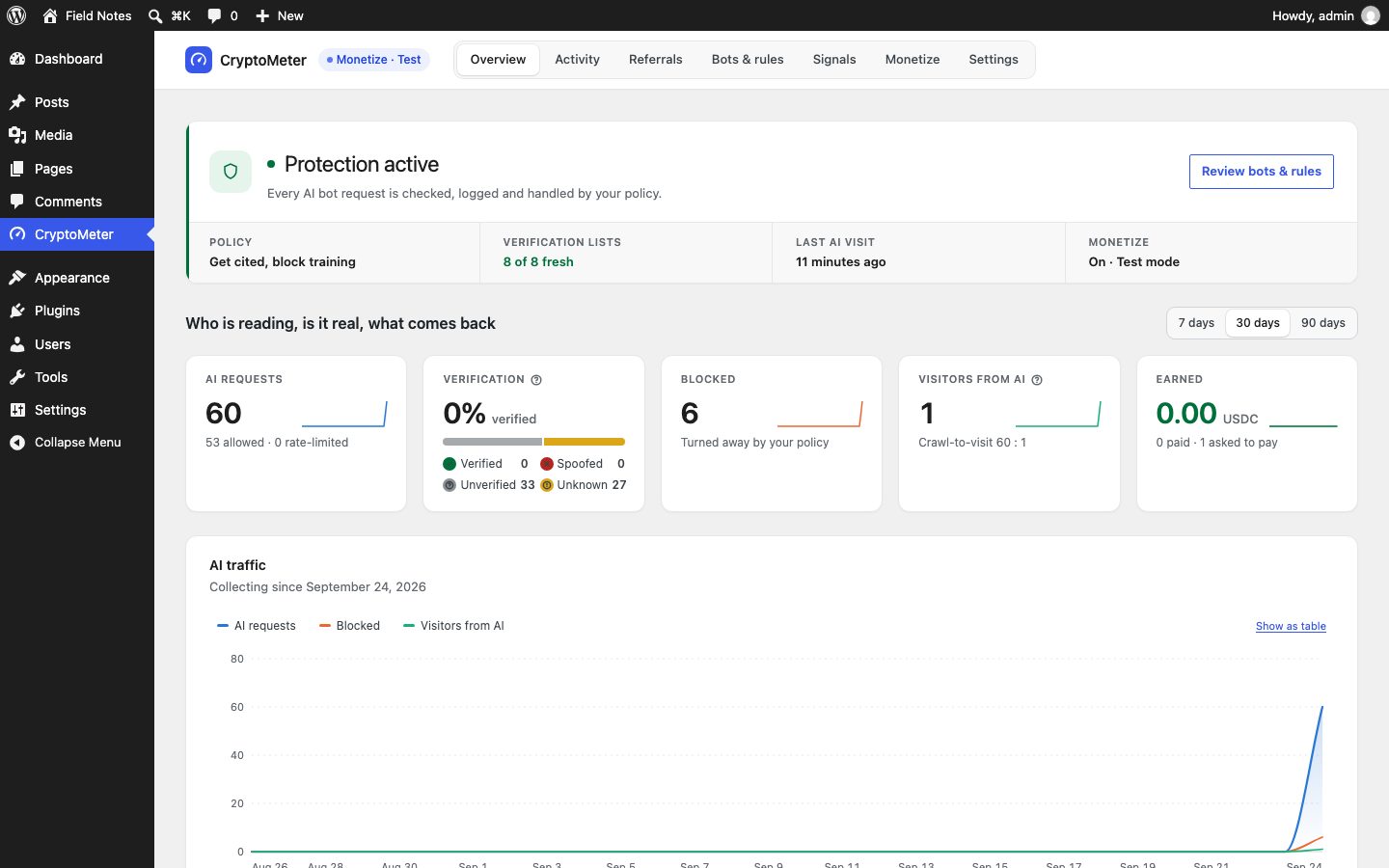
CryptoMeter overview on a test site: protection active, AI requests, verification, blocked, visitors from AI, earned, and the AI traffic chart
Revenue calculatorWhat could it earn you?Your users, volume and fee — the caps come from the code.Revenue calculator →
bots in the registry (28 AI + 6 search)34
9:41
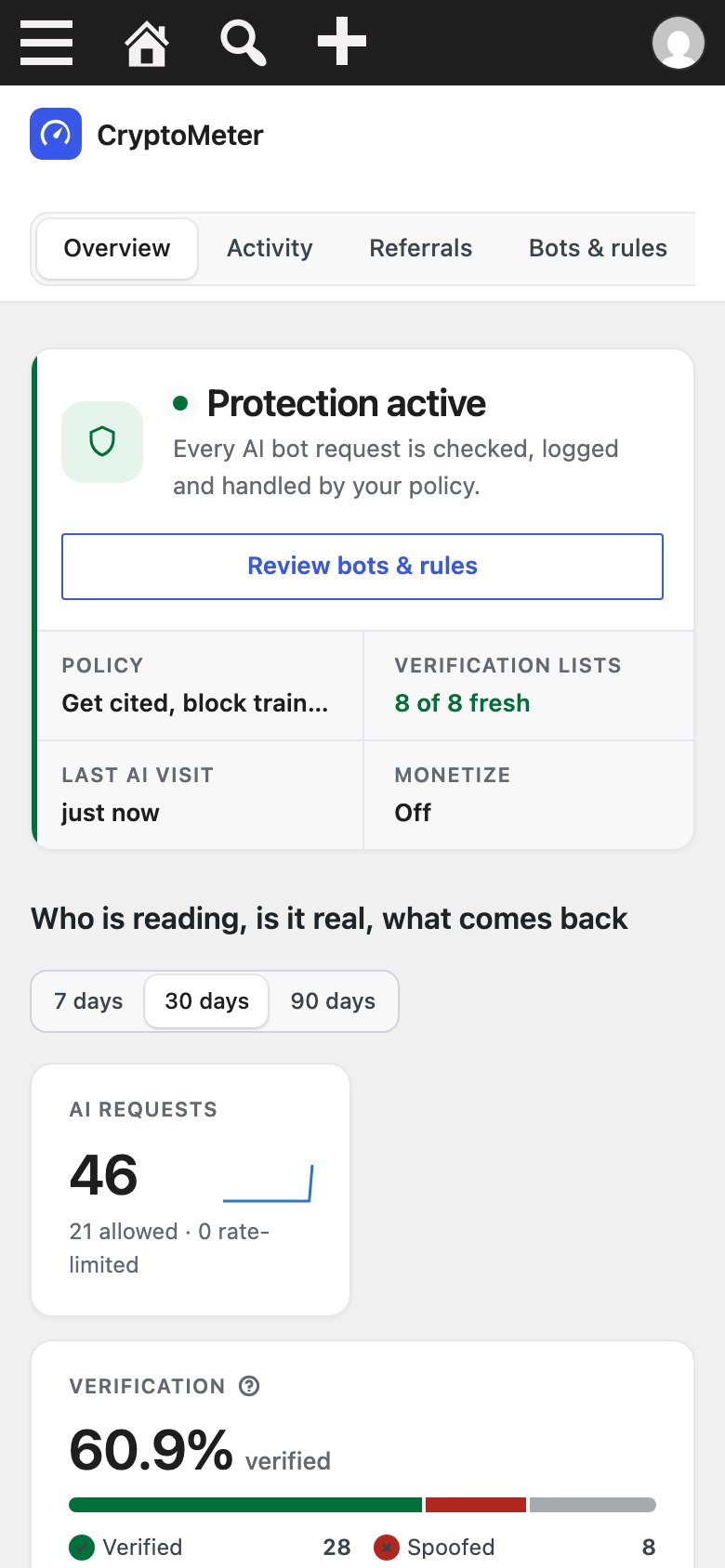
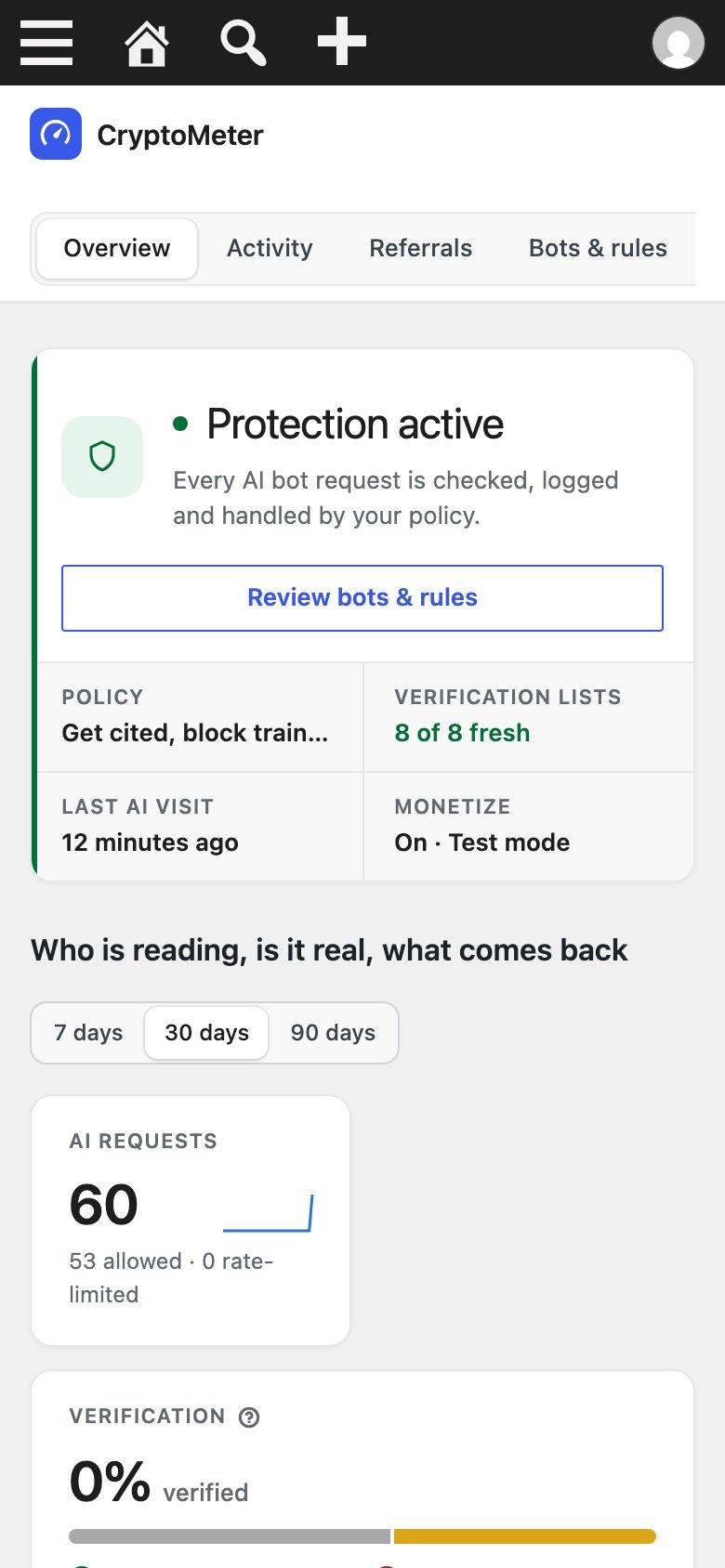
CryptoMeter overview on a phone: protection status, AI requests, verified and blocked bots and visitors from AI
WP Admin · sample data on a test site
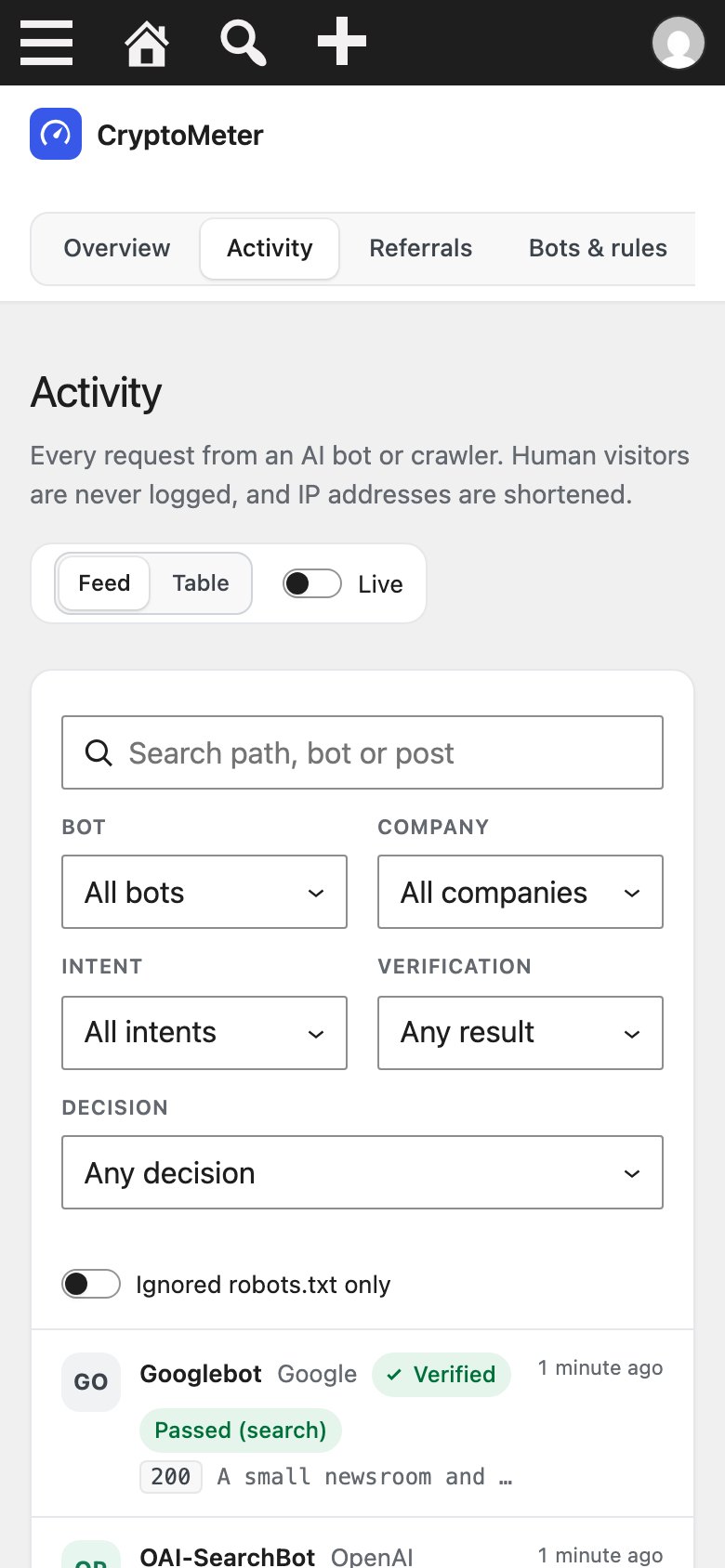
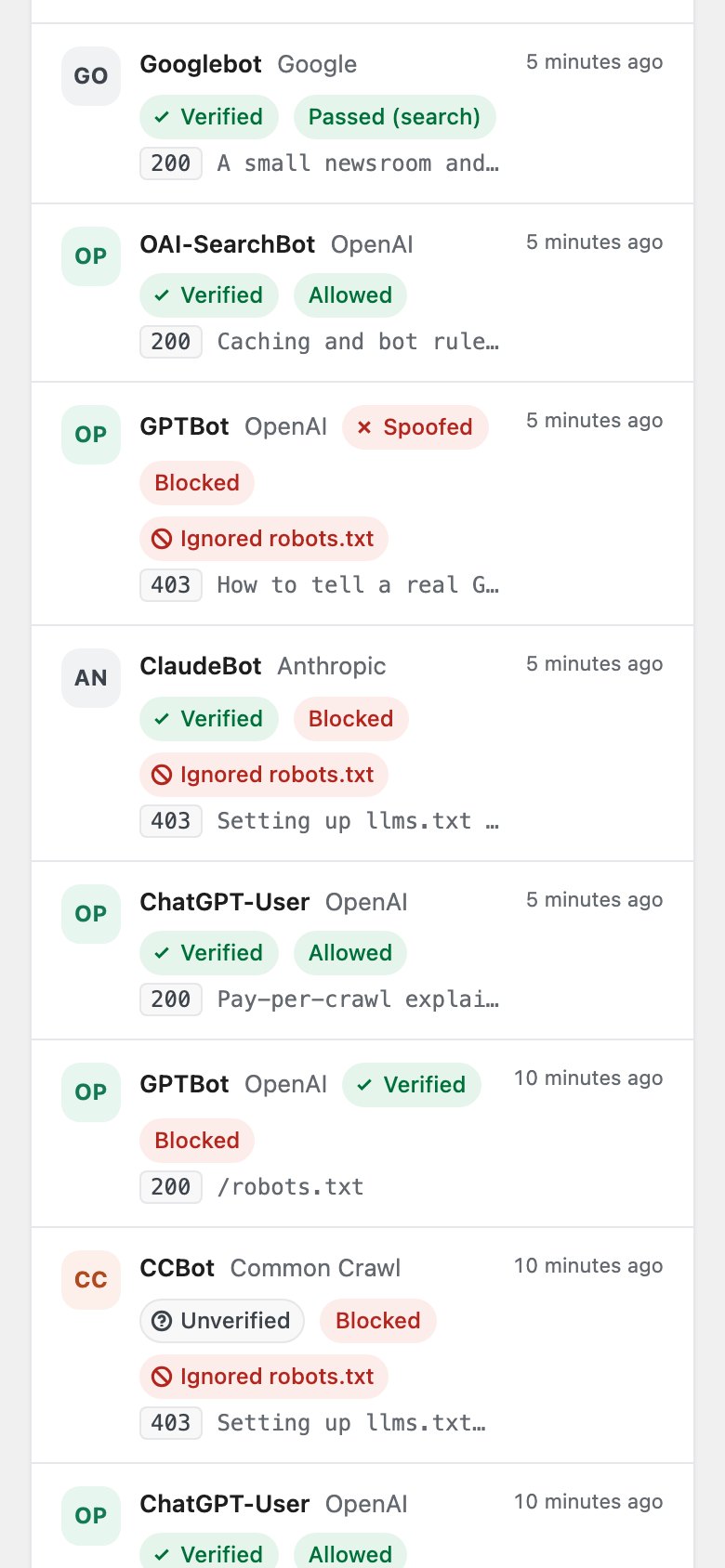
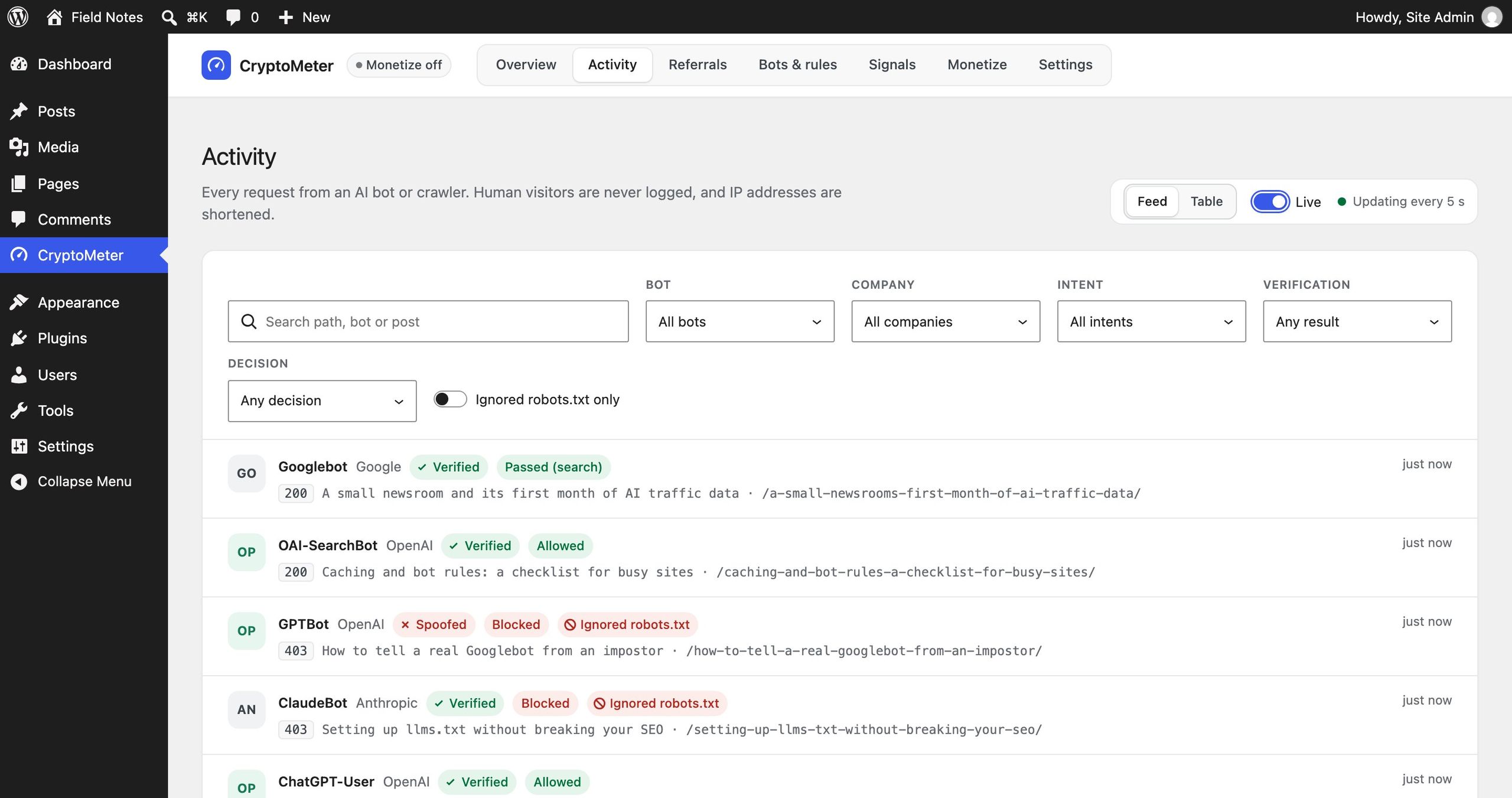
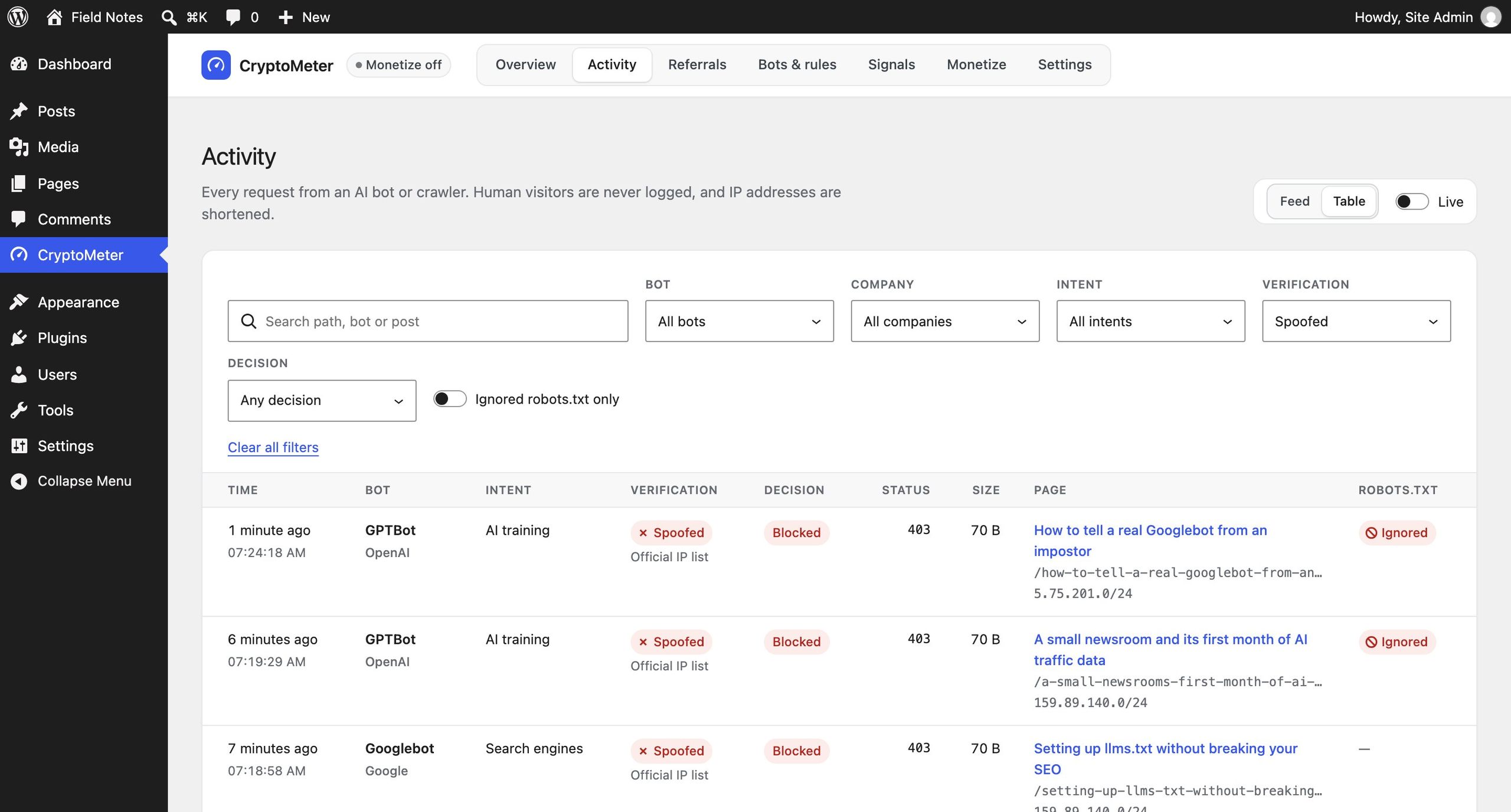
CryptoMeter activity feed inside WP Admin: every AI crawler request with the bot, its company, a Verified or Spoofed verdict, Allowed or Blocked, whether robots.txt was ignored, the status code and the path it asked for.
WP Admin with sample data, shot from the plugin running on a test site. Human visitors are never logged and IP addresses are shortened — that line is the plugin's own.

Built on

  • WordPress
  • PHP 7.4–8.4
  • x402
  • USDC
  • WordPress
  • PHP 7.4–8.4
  • x402
  • USDC
  • WordPress
  • PHP 7.4–8.4
  • x402
  • USDC
  • WordPress
  • PHP 7.4–8.4
  • x402
  • USDC
  1. Identify34 known bots, by user agent, official IP lists, rDNS and signatures
  2. Verifyverified, spoofed, unverified or unknown — per hit
  3. Decideone policy per intent: search, AI search, agent, training
  4. Measurewhat each AI company takes vs. the readers it sends

Business plan

Control AI traffic.
Sell it as a service.

Buy the source code once. Run it under your brand. The revenue lines are already in the code — they pay you, not us.

  1. 01Buy the pluginOne-time purchase, no monthly fee, no MIKODES cut.
  2. 02InstallAllow AI search, block training, see who sends readers.
  3. 03Offer itSell setup and monthly AI-traffic monitoring to the sites you manage.
  4. 04Optional: charge agentsx402 pay-per-read in USDC on your own sites.

Who runs it

  • WordPress agencies and freelancers
  • Publishers and content sites
  • SEO consultants

Where the money comes from

  • Your AI-traffic serviceSetup and monitoring you sell to client sites — your service, not a plugin fee
  • Agent payments (x402)USDC straight to the site owner's wallet — optional, off by default

Running costs None beyond WordPress hosting. Each client site needs its own plugin licence (a CodeCanyon licence covers one end product).

Earnings calculator

What could CryptoMeter
earn you?

Move the sliders. Caps come from the code; prices and traffic are yours to set.

Realistic example · revenue per month

—

— per year

  • Your AI-traffic service
  • Agent payments (x402)
Est. running cost—
Left for you / month—

Example scenarios, not a forecast or a promise. The service line is what you charge your own clients; the plugin takes no fee and adds none. Plugin licences per client site and your working time are not included. Few AI agents pay per read today.

For the site owner

Get cited, not scraped.
Sell the setup, keep the readers.

  • Allow AI search and agents that send readers; block training by default
  • See the readers each AI company sends back, per post — proof you can show a client
  • Sell setup and monthly AI-traffic reports to the sites you manage
  • Optional x402 module: agents pay per article in USDC, straight to the site's wallet
  • No account, no monthly fee, no MIKODES cut
34bots in the registry (28 AI + 6 search)
176self-test checks, PHP 7.4 and 8.4
cryptometer.mikodes.com
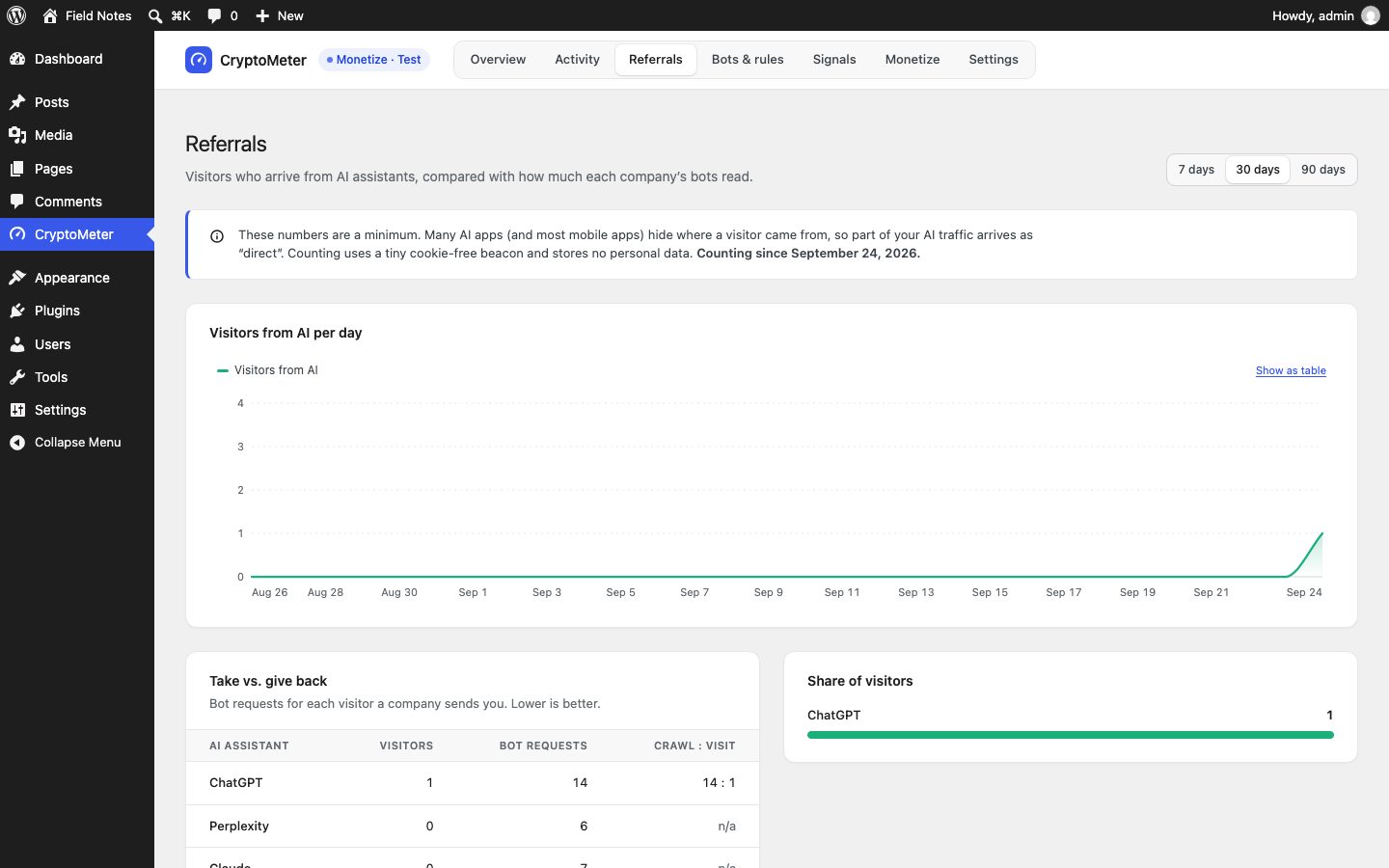
Referrals: visitors from AI per day and the take vs. give back table per AI assistant
Take the tour →

What it does

Who is reading, is it real,
what comes back.

GPTBotopenai.com/gptbot.jsonverified
“ClaudeBot”IP not in Anthropic listspoofed
Googlebotforward-confirmed rDNSverified

Verified bot identity

Checks every AI hit against 8 official vendor IP lists, reverse DNS and Web Bot Auth signatures. A fake “GPTBot” is spoofed, not trusted.

Only public lists are downloaded · nothing about your visitors is sent
Search enginesallow
AI search & answersallow
AI agentsallow
AI trainingblock

One policy per intent

Search, AI search, AI agents and AI training each get allow, block or charge, with per-bot overrides. Default preset: get cited, block training.

Enforced by WordPress: 403 and 429 rate limits
ChatGPT14 requests · 1 visitor14 : 1
Claude7 requests · 0 visitorsn/a
Perplexity6 requests · 0 visitorsn/a

Crawl-to-visit ratio

Counts the visitors each AI assistant sends back and compares them with what its bots read. See who gives back and who only takes.

A lower bound, and the page says why
AI trainingNo
robots.txtContent-Signalaipreflicense.xmltdmrep.jsonnoai

AI signals from one screen

Publishes your choices as robots.txt, Content-Signal, Content-Usage, RSL license.xml and TDMRep — with a live preview of each file.

Signals are requests, not locks — Bots & rules enforces
Nginx15 user agents blocked
CopyLoopback test
nginx.htaccessLiteSpeedCloudflareWP Rocket

Server and cache rules

Copy-paste snippets for nginx, Apache, LiteSpeed, Cloudflare and WP Rocket, so blocked bots stop before WordPress and caches don't hide AI hits.

Regenerated from your current policy
GPTBotGET /heat-pumps-guide402
0.002 USDC · Basesigned by the agent
PaidMarkdown + receipt200

Optional: x402 pay-per-read

Off by default. x402-capable agents get HTTP 402 and pay per article in USDC to your wallet; a facilitator you choose settles it.

Non-custodial · the site stores a public address only

Illustrations of built features, with numbers from a local test site. The screens below are real.

The rest of the product

What you cannot see from the front.
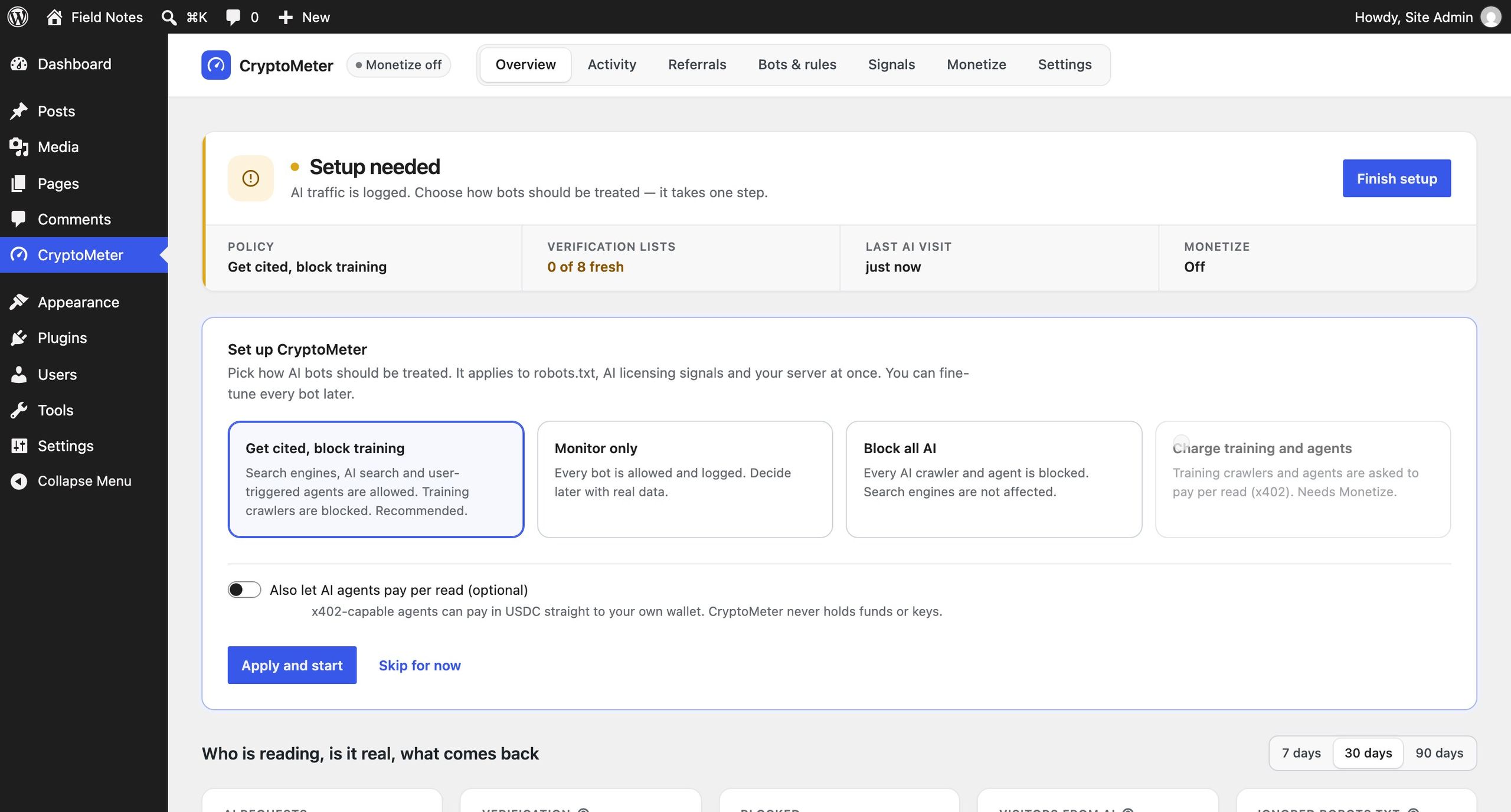
First run, and an impostor being refused.

The plugin lives in WP Admin. Setup is one choice, and this is what the activity table looks like when something claiming to be Googlebot is not.

What does setting it up involve?

WP Admin · sample data on a test site
CryptoMeter first run inside WP Admin: a Setup needed notice saying all traffic is logged and the operator chooses how bots are treated, three policy cards for cited-and-trained, monitor only and block all AI, and an Apply and start button.
The whole of setup is one choice, made in WP Admin. The plugin writes it to robots.txt.

What happens when something goes wrong?

WP Admin · sample data on a test site
CryptoMeter activity table filtered to spoofed requests: rows where a crawler claimed to be GPTBot, Googlebot or ClaudeBot, each marked Spoofed, Blocked, answered 403, with the path asked for and whether robots.txt was ignored.
An impostor claiming to be a known crawler, caught by reverse DNS and the published IP lists, and refused.

What does it look like on a phone?

9:41
The CryptoMeter overview in WP Admin on a phone
Overview
9:41
The live activity feed in WP Admin on a phone
Activity
9:41
The activity list on a phone, one request per row
Every request
WP Admin on a phone. The plugin adds no front-end of its own.

Interactive tour

See every screen.
Then try it live.

No public demo is hosted yet — these are the real screens, and the docs walk through every step.

cryptometer.mikodes.com
CryptoMeter overview on a test site: protection active, AI requests, verification, blocked, visitors from AI, earned, and the AI traffic chart
9:41
CryptoMeter overview on a phone: protection status, AI requests, verified and blocked bots and visitors from AI
cryptometer.mikodes.com
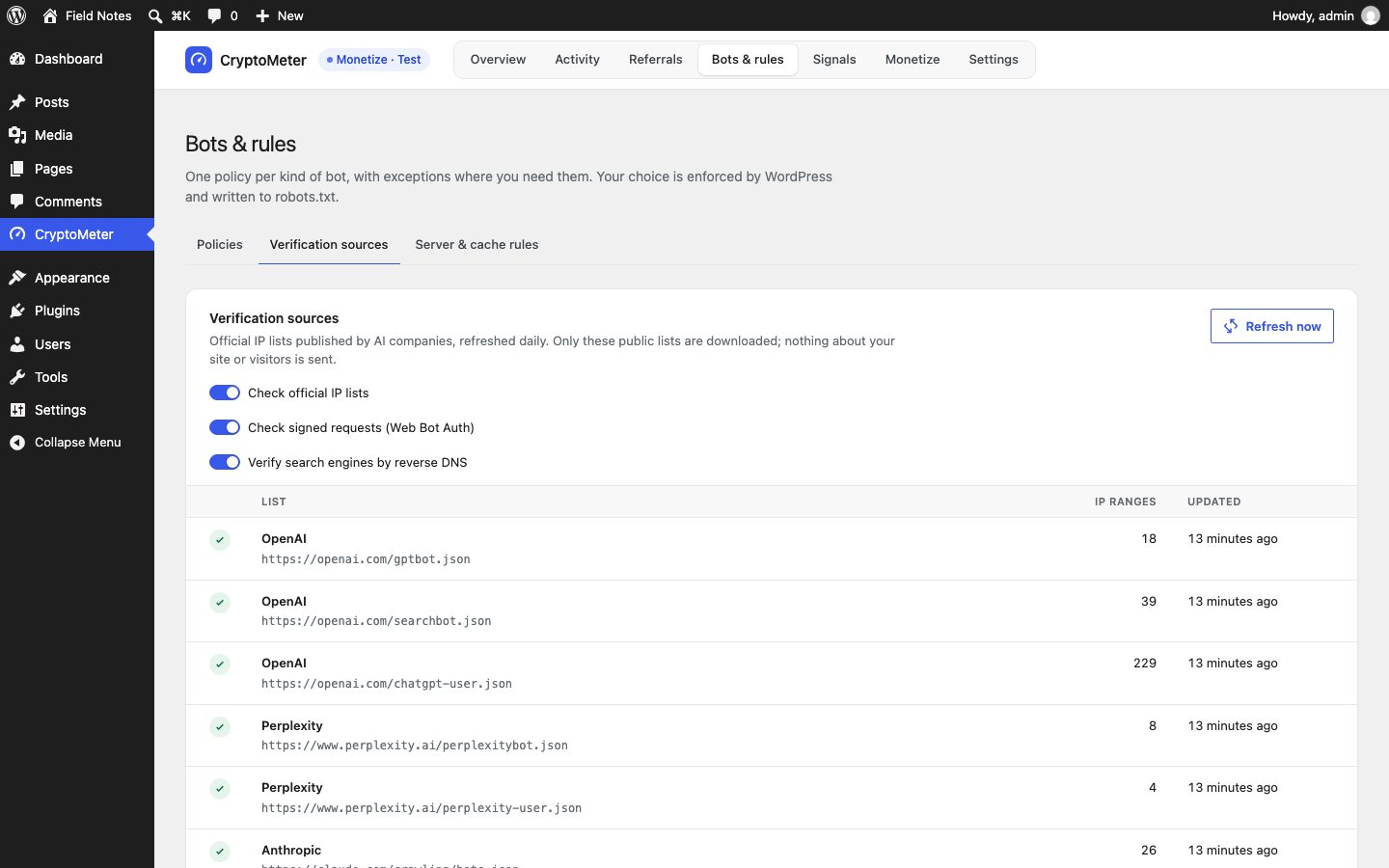
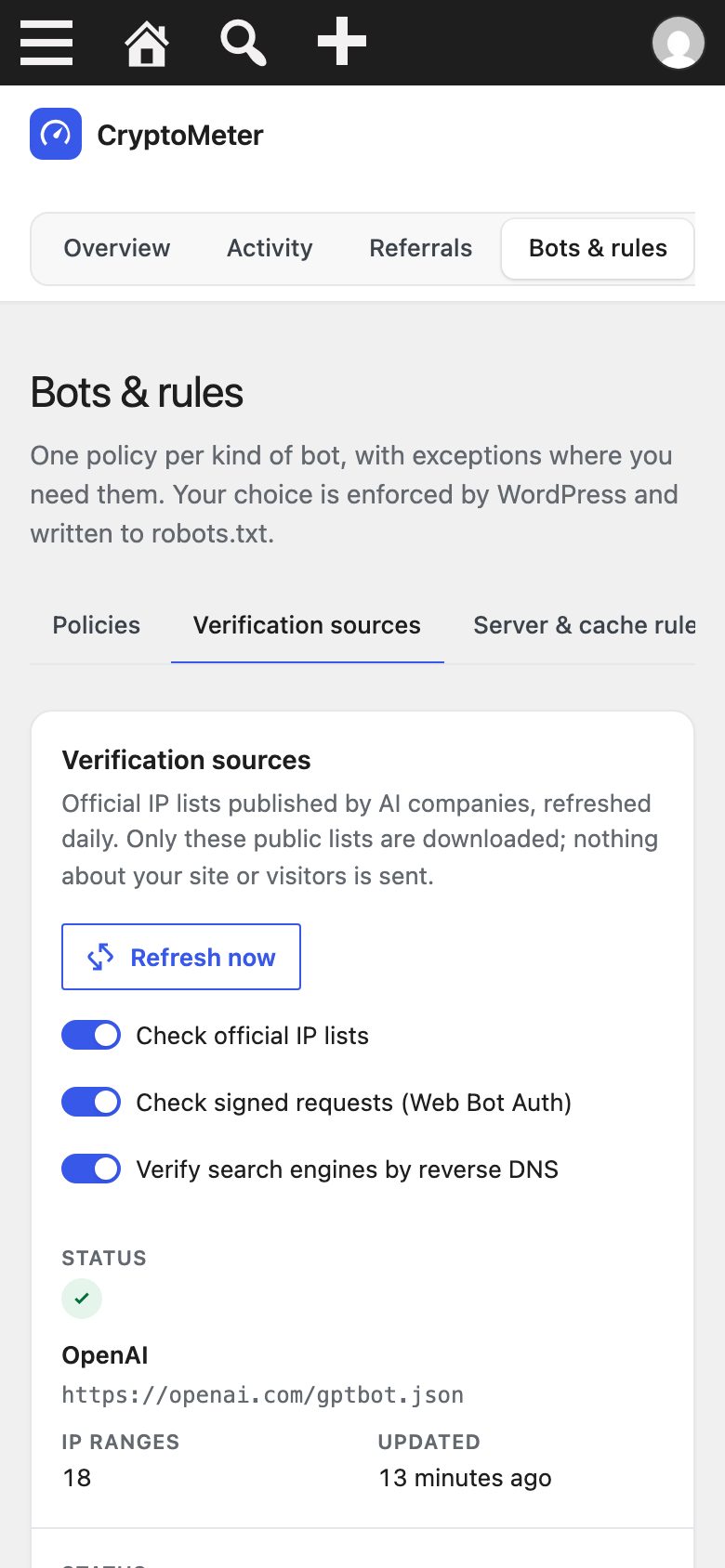
Bots & rules, verification sources: official IP lists from OpenAI, Perplexity and Anthropic with range counts and last refresh
9:41
Bots & rules, verification sources: official IP lists from OpenAI, Perplexity and Anthropic with range counts and last refresh
CryptoMeter first run inside WP Admin: a Setup needed notice saying all traffic is logged and the operator chooses how bots are treated, three policy cards for cited-and-trained, monitor only and block all AI, and an Apply and start button.
CryptoMeter activity table filtered to spoofed requests: rows where a crawler claimed to be GPTBot, Googlebot or ClaudeBot, each marked Spoofed, Blocked, answered 403, with the path asked for and whether robots.txt was ignored.
9:41
The CryptoMeter overview in WP Admin on a phone
9:41
The live activity feed in WP Admin on a phone
9:41
The activity list on a phone, one request per row
cryptometer.mikodes.com
Referrals: visitors from AI per day and the take vs. give back table per AI assistant

Every AI bot, checked against the vendor's own list.

OpenAI, Anthropic, Perplexity and more publish their IP ranges. CryptoMeter refreshes them daily.

cryptometer.mikodes.com
Bots & rules, verification sources: official IP lists from OpenAI, Perplexity and Anthropic with range counts and last refresh
9:41
Bots & rules, verification sources: official IP lists from OpenAI, Perplexity and Anthropic with range counts and last refresh
Take the tour →

Honest about what a plugin can do.

ON YOUR SITEno visitor data leaves WordPress; humans are never logged
SIGNALSrobots.txt and licences are requests — enforcement is the 403
NO PROMISESfew agents pay today — pay-per-read is an extra, not a revenue plan

Tested on WordPress Playground with SQLite, PHP 7.4.33 and 8.4.25. MySQL not tested yet.

Documentation

Installed in an afternoon.
Every step written down.

19 pages written from the real code — requirements, install, configuration, deployment, troubleshooting.

Documentation

Buy the plugin

Own CryptoMeter.
Ship it as yours.

  • Full source code, yours to rebrand and run
  • Documentation — 19 pages, also online
  • Item support through CodeCanyon

Installation & customization

Want it installed on your servers, rebranded or extended? The team that built it does that — write to us.

CryptoMeter · source code

Coming to CodeCanyon

CryptoMeter is not on sale yet — it is being prepared for CodeCanyon, where it will be sold.

See every screen in the docs.

Version 1.0 · 176 self-test checks green · not on sale yet · no hosted demo — the docs show every screen

Installation & custom work

The download is not the end of it.
Tell us what you need.

The code is sold on CodeCanyon. The work around it — getting it live, changing it, or building you something of your own — is ours, and it starts as a conversation on Telegram, not a form.

Install it for me

You bought the code and you want it running, not a folder of files.

  • On your own servers, your domain, your keys
  • Your name and colours, not ours
  • Handed over working, with what we changed written down

Add features

CryptoMeter plus the one thing it does not do yet.

  • A screen, a chain, a payment method, a report
  • Built into your copy, so updates still apply
  • We say up front if it is a bad idea

Build something custom

A product of your own, on foundations that already work.

  • Starts from what is proven here, not a blank page
  • Yours alone — we do not resell it
  • Same standard as the products on this page

MIKODES is a Slovak company and has been selling on CodeCanyon since April 2019. 17 products run in the open at mikodes.com — Solana, Hyperliquid, Base, Telegram and WordPress. Tell us what you need and we will tell you what it takes; we will also say when we are the wrong people for it.

Talk to us

Start the conversation.

Telegram is fastest and it reaches the person who built this, in English. Describe what you need and you get an honest answer about what it takes. The source code itself is sold on CodeCanyon.

Telegram · fastest

Talk on Telegram

E-mail

For installation and customization quotes.

Other MIKODES products

Also by MIKODES.

TourBuy the plugin